Prerequisites - How to upload resorses to a web server computer system and to access them
- 3.0 Something more about JavaScript
Motivations, and/or learning outcomes - Understand the fundamental concepts of HTML and CSS
- Use the fundamental concepts to develop dropdown menus and modal windows
HTML elements and their attributes, and CSS properties - (Note that an object in JavaScript code has properties and methods. In fact, methods are properties in which function values are stored.)
- An HTML document(or page) is like a tree of HTML elements.
- List all the HTML elements that you know.
- What is the main purpose of using attributes? How about CSS?
- What does inheritance in the hierarchical structure mean? For example, what color is used for 'inheritance' in the next code?
<p style='color:Blue'>
    What does <b>inheritance</b> in the hierarchical structure mean?
<p>
Trial 1: Let's try the above example, with the following.
Box model - Read all in CSS Box Model.
- What components are included in the box model?
Which component(s) is(are) included in width and height of an HTML element box?
Content only- What is the default width for <p>? Default width for other elements such as <span>?
- How are attributes and properties different?
Here is an example. <div style='border: 1px solid black'> <div style='margin: 20px; border: 10px solid blue; padding: 20px; background-color:Gray; font-size:150%;'> <div style='border: 1px solid black'> <span style='background-color:Green'>Hmmm</span> <p style='background-color:Red'>Amazing!</p> <span style='background-color:Yellow'>Another span</span> <a href='//cs.tru.ca' target='_blank' style='background-color:Cyan'>CS.TRU.CA</a> </div> </div> </div>Trial 2: The middle <div> will have the margin of 20px, the border line of 10px thickness, the padding of 20px. Can you change the width and height of any HTML element? Let's try with <span> or <a>, and <p>. How to get width and height of an element in JavaScript code?
See clientHeight, clientWidth, offsetHeight, offsetWidth in The HTML DOM Element ObjectHow to get the position of an element in JavaScript code, which is relative to the parent?
See offsetTop, offsetLeft in The HTML DOM Element Object
Two display types of element - How to display elements - Inline type elements - For examples, ...
- Block type elements - For examples, ...
- How are they different? Inline elements are displayed at the side, and block elements are displayed at the next line.
- Default width for block elements?
Here is an example. <div style='border: 2px blue solid'> <p style='width: 400px; border: 2px black solid''> Strike while the iron is hot. </p> <span style='border: 2px green solid'> Too many cooks spoil the broth. <div style='border: 2px yellow solid; width: 400px;'> You can't have your cake and eat it too. </div> Many hands make light work. </span> <span style='border: 2px black solid; width:400px'> When in Rome, do as the Romans do. </span> <p style='border: 2px black solid; width=50%'> Don't cross the bridge until you come to it. </p> <span> <-- Will it be displayed at the side of the above paragraph? --> Honesty is the best policy. </span> </div>P: Strike while the iron is hot.
SPAN: Too many cooks spoil the broth.DIV: You can't have your cake and eat it too.Many hands make light work. SPAN: When in Rome, do as the Romans do.P: Don't cross the bridge until you come to it.
SPAN: Honesty is the best policy.Trial 3: Try yourself headings, p, span, div, a, img ('html5.png'), ul, li. Find out which ones are of inline type and which ones are of block type. Can you change height and width of any inline elements?
Directly? No. Then is there any way to change the width and height of inline elements?
Displaying - How to change the display type CSS property to change display type ???
displayDisplay types? - block
- inline
- inline-block
- none
- ...
Here is an example of 'inline-block'. <div style='border: 2px blue solid'> DIV: <span> SPAN: The grass is always greener on the other side of the fence. <span style='display:inline-block; border: 2px yellow solid; width: 250px; text-align: center'> SPAN: CS, TRU </span> Don't judge a book by its cover. <span> </div>DIV: SPAN: The grass is always greener on the other side of the fence. SPAN: CS, TRU Don't judge a book by its cover.Trial 4: Let's try to change <span> to block type and test. You may change <p> to inine-block type as well. Trial 5: Let's try to change <div> to 'none' type and test what will be displayed.
Grouping - Why do you need to group elements?
As an inline element, ???
<span>As a block element, ???
<div>- The above two elements are called containers, inline container and block container.
- How to make an element or a group of elements disappear when a button is clicked?
This could be used for modal windows.
Here is an example. "This sentence will be disappered when the button is clicked."
Trial 6: Let's try to hide <div> and show it when a button is clicked. Initially the <div> is displayed. Hint. document.getElementById(...)....
Positioning List the four positioning methods. How are they different? - Static - the normal flow of elements with their display types; default type
- Relative - relative to normal position
- Fixed - relative to the viewport, which means it always stays in the same place even if the page is scrolled.
- Absolute - relative to the nearest positioned (anything but static) ancestor (Note <body> is considered as a positioned element.)
- [Sticky - between relative and fixed with scroll bars]
- Read all in CSS Layout - The position Property.
- In the 4th example in the above link, what will happen if the outer <div> does not use the relative positioning?
Four position properties? - top
- bottom
- left
- right
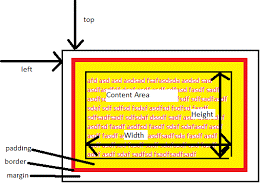 How about right and bottom?
Here is another example. <div style='border:1px solid black'> <p> Positioning examples: </p> <!--You can try the next code yourself.--> <!-- No position value in the next div -> It follows the natural flow. --> <div style='position:relative; width:400px; height:200px; border:1px solid black;'> <div style='position:absolute; top:10px; right: -50px; width:250px; height:100px; border:2px solid blue;'></div> <div style='position:relative; top:50px; left: 50px; width:250px; height:100px; border:2px solid green;'> <p style='position:relative; left:25px; top:5px; width:100px; margin:0px; text-align:center; border:2px solid red;'> Interesting! </p> Ahhhhhhh <!-- In the next <p>, top is not specified. -> The natural flow is used for the top value. It is confusing. It might be better to use two position values, such as top&left, top&right, bottom&left, or bottom&right. --> <p style='position:absolute; left:50px; width:100px; margin:0px; text-align:center; border:2px solid yellow;'> Hmmmmm </p> </div> </div> </div>Can you show how the above code is displayed? Click here to see it. Positioning examples:
Interesting!
AhhhhhhhHmmmmm
Trial 7.1: Try yourselves the above example. Trial 7.2: Let's try to display an <ul> right below a <li id='tr7-2-menu-head'>, where the <ul> is a child element of the <li>. One good practice for good positioning is to use 'relative' or 'absolute' for the parent element and 'absolute' for child elements. Trial 7.3: Let's try to display an <ul> right below a <li id='tr7-3-menu-head'>, where the <ul> is a child element of the <li>, only when the mouse moves over the <li>. Initially, <ul> is not visible. Trial 7.4: Let's try to display an <ul> at the right side of a <li id='tr7-2-menu-head'>, where the <ul> is a child element of the <li>. - An example of drop-down menu
- COMP2680
- COMP3540
- COMP3710
Trial 8: Let's write the code for the above drop-down menu, with 'menu_icon.png'. Measurement units - px - pixel
- % - relative to parent width or height; 0% ~ 100%; Note that % works well with absolute positioning.
- 0
- vw - relative to viewport width; 0vw ~ 100vw
- vh - relative to viewport height; 0vh ~ 100vh; Note that vw and vh are good choice for fixed positioning.
Overlapping - When HTML elements are positioned, they can be overlapped. Which element should be displayed first?
- Read all in CSS Layout - The z-index Property.
- Warning: 'z-index' works only with poisitioned elements with relative, fixed, and absolute.
- Warning: 'z-index' is inherited to all the descendants no matter what value is re-specified in the descendants.
Trial 9: Let's try to display 'HTML5' over 'html5.png'. - Can you make a modal window? E.g.,
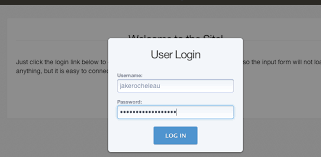 We will study it later in detail.
How to control HTML elements from JavaScript code? - All the HTML elements are modeled in a DOM tree as objects. You need to know how to get those HTML element objects.
- Example
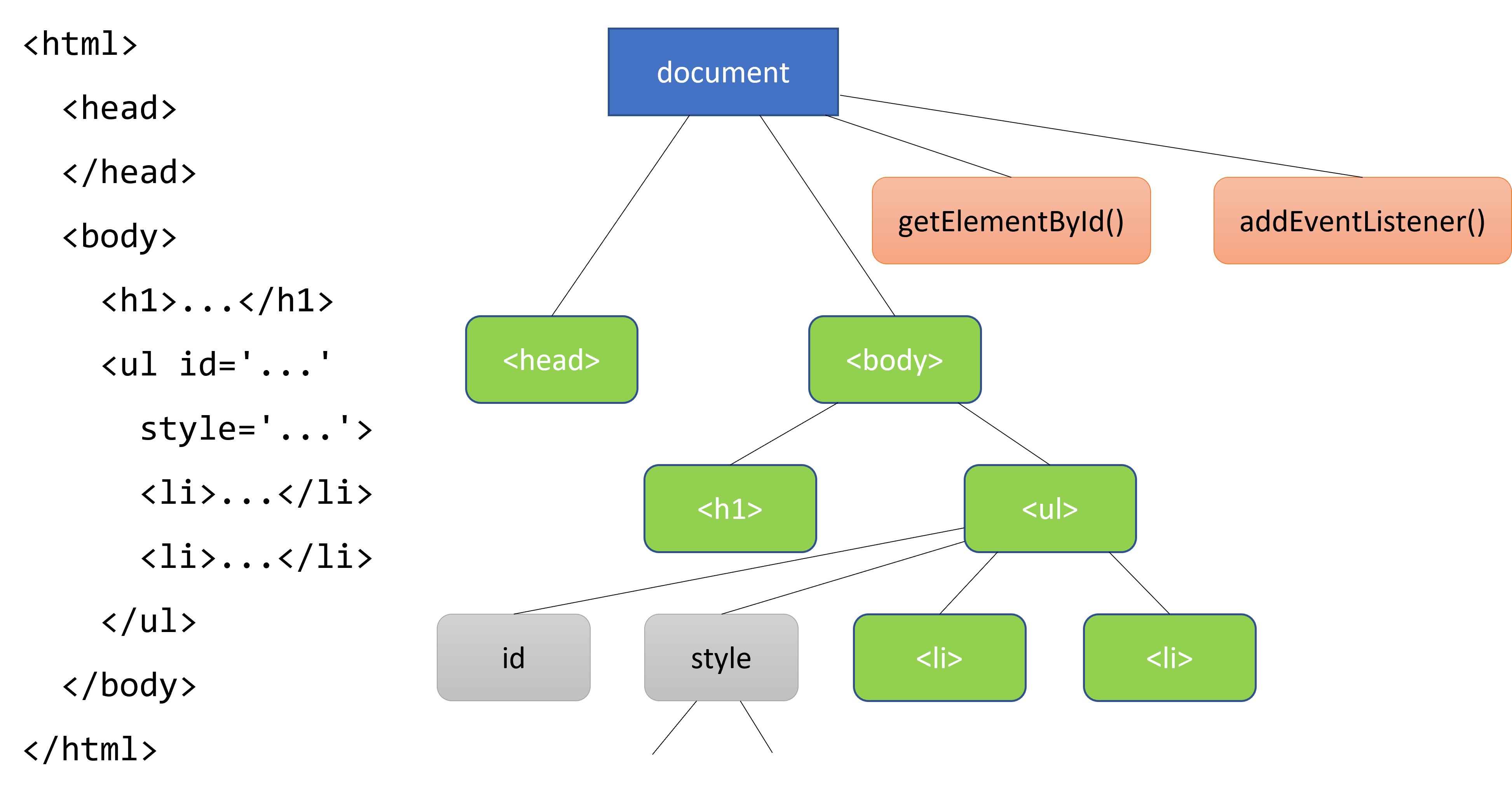
- We can select HTML elements with the attribute 'id', tag names, and CSS selectors
document.getElementById('...');document.getElementsByTagName('...');document.querySelectorAll("...");
- From a selected HTML element object, we can access its content, attribute, and CSS properties.
htmlElementObj.innerHTMLhtmlElementObj.setAttribute(), .getAttribute(), .style.setProperty(), .style.getProperty();
E.g.,.style.setProperty('background-color', 'Cyan')htmlElementObj.attribute,.style.property;
E.g.,.style.backgroundColor = 'Cyan';
How about 'background-color'?
You need to use camel back notation; E.g.,.style.backgroundColor = "Red";- How to change CSS values?
- How to register event listeners?
htmlElementObj.addEventListener("event-name", function() { ... });
Trial 10: Let's try to hide and show 'html5.png' using a button.
How to read default CSS properties that are not defined in style attribute? How to read actual width and height that are decided by the content? - The CSS properties defined in <style> tags CANNOT be accessed through
document.getElementById(...).styleobject in JavaScript. Default values as well. window.getComputedStyle(htmlElementObj).cssPropertyshould be used, even for default values.- When
htmlElementObjis visible,htmlElementObj.clientWidthand.clientHeightgive numbers of pixels. E.g., 100, not "100px". You may read The HTML DOM Element Object. Here is an example. <style> #testcssjs { display: none; } </style> <div id='testcssjs'> Hmmm </div> <script> alert("1. " + document.???('testcssjs').???.display); // Nothing displayed because 'display' is not specified with the style attribute. alert("2. " + ????(document.getElementById('testcssjs')).???); // 'none' displayed document.getElementById('testcssjs').style.display = 'block'; alert("3. " + document.getElementById('testcssjs').style.display); // 'block' displayed alert("4. " + document.getElementById('testcssjs').style.height); alert("5. " + ????(document.getElementById('testcssjs')).display); // ??? displayed alert("6. " + ????(document.getElementById('testcssjs')).height); // "24px" alert("7. " + document.getElementById('testcssjs').clientHeight); // 24, not "24px" </script>Trial 11: Let's try the above example. - Reference: https://developer.mozilla.org/en-US/docs/Web/API/Window/getComputedStyle
- The CSS properties defined in <style> tags CANNOT be accessed through